
LinkedIn email finder
Find the email missing from their LinkedIn profile. Paste the profile address below. We look up the person and their company, even when Contact info has nothing to offer.
Example
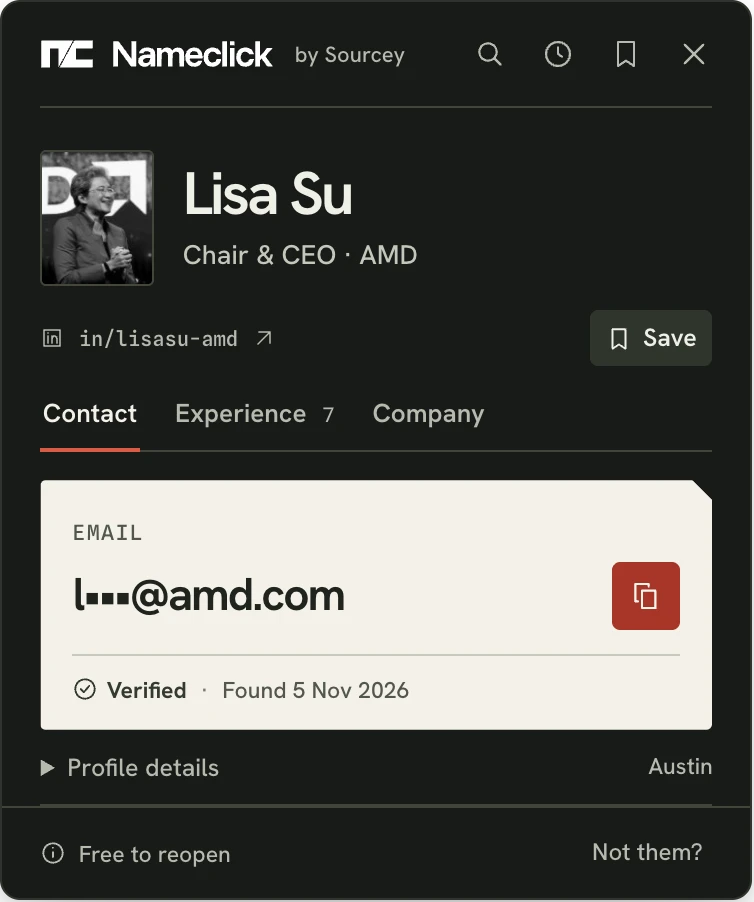
What the card shows
- See who matched. Photo, title, employer and location come first. Spot a different person before you copy.
- Check their employer. Changed jobs since Seen? Compare their employer with the email's domain. An address at a company they've left will bounce.
- Read their experience. Open their roles in the same card, with dates and the current role first.
- Look inside the company. Size, industry and funding sit alongside its contact details and Sourcey record.
A lookup counts only when it shows an email, so a miss costs nothing.
Find email on the profile
Our Nameclick extension puts the same card on every LinkedIn profile you open. Press the Nameclick mark in its corner, then Find email. You need neither Premium nor Sales Navigator. We never sign in to LinkedIn or use your account. Install it in Chrome, Edge or Firefox; Brave, Arc and Opera use the Chrome Web Store.
How to find someone's email from LinkedIn
Copy the person's profile address
Copy their LinkedIn profile URL from your computer's address bar or your phone's profile share menu. A person's address has "in" between slashes. Company pages and search results won't work here.
Paste it here
We show the matched person's photo, title, employer and location before you copy an email. Compare them with the LinkedIn profile. A familiar name isn't enough to identify somebody.
Open their contact card
Contact shows the email. Experience lists every role with dates, current first. Company adds size, industry, phone, links, every funding round and the company's Sourcey record. Roles and company open in the same card at no extra cost.
Look beyond LinkedIn
On GitHub, open a profile and press Alt+Shift+N (Option+Shift+N on a Mac); there's nothing to select. On X, YouTube or any other page, select their name first. You can also right-click the selection and choose Find email.
Other ways to reach them
LinkedIn gives you several ways to start a conversation. Getting an email address is a different matter.
Contact info
Under their name, open Contact info. LinkedIn shows an email only if their settings allow you to see it. The default is to share with direct connections.
Connect first
Send a connection request with a short note explaining why you're getting in touch. Once accepted, Contact info may reveal their email. They can also keep it hidden from connections.
InMail
Premium lets you message someone you aren't connected to inside LinkedIn. They may get an email notification, but you still don't have their address. A paid message is easy to ignore, too.
Their company's website
Look at team, press and contact pages for a published address. The company is also the most useful clue for an email finder when all you have is a name. Find email by name and company
Other ways to find an email with Nameclick
Questions
Can you find an email when their LinkedIn profile shows none?
LinkedIn's Contact info isn't the limit of what's available. We use professional contact records to find the address on record for that person where they work. If they've published an email on their own public GitHub profile, we show it as theirs.
Is the LinkedIn email lookup free?
This LinkedIn form gives you three lookups a day without signing up, then three more tomorrow. The extension includes 3 more a day: sign in with Google at your first lookup to create a free Nameclick account. Only a result showing an email counts. Misses, failures and matches you report as the wrong person cost nothing. Everyone you've found reopens free from the toolbar, for good.
What appears if there's no email on record?
A LinkedIn profile can identify someone even when we have no email for them. You'll still see the matched person, their roles and their company, and the lookup won't count.
What do Verified and Seen tell me?
A Verified address has been checked to take mail; Seen is the date we last observed the record. If their LinkedIn profile shows a job change since then, compare their employer with the email's domain. An address at a company they've left will bounce.
Can I search without a LinkedIn URL?
Our other web finder accepts a name and where they work, or a GitHub username. For AI agents, add the MCP server shown on this page with the key from the extension's settings. find_contact finds and enriches a contact; get_contact reopens one free. Find someone by name and company
What happens to the profile URL I submit?
A URL or username you look up isn't tied to you. We keep the contact record we find for the next person who asks. The extension reads nothing until you press. Then it reads what it needs from the page you're on to identify the person: the open profile, or a name you selected with Alt+Shift+N (Option+Shift+N on a Mac) and the text around it. None of that is stored. We never read other tabs, history or messages. Anyone can request removal through Nameclick's removal form, without giving a reason. Once removed, nobody can look them up again. Privacy policy
Get the extension
The Nameclick extension finds their email in one press, with 3 free lookups a day.
- ChromeChrome Web Store
- EdgeIn review
- FirefoxIn review