
Bring the reference into the same site.
Sourcey vs Starlight
Starlight is a strong choice for a documentation site built on Astro. Sourcey is worth trying when the site also needs to read API specs or code comments directly. Try the same guide and reference in both, then compare the pages and the build behind them.
A technical spec can look this good.
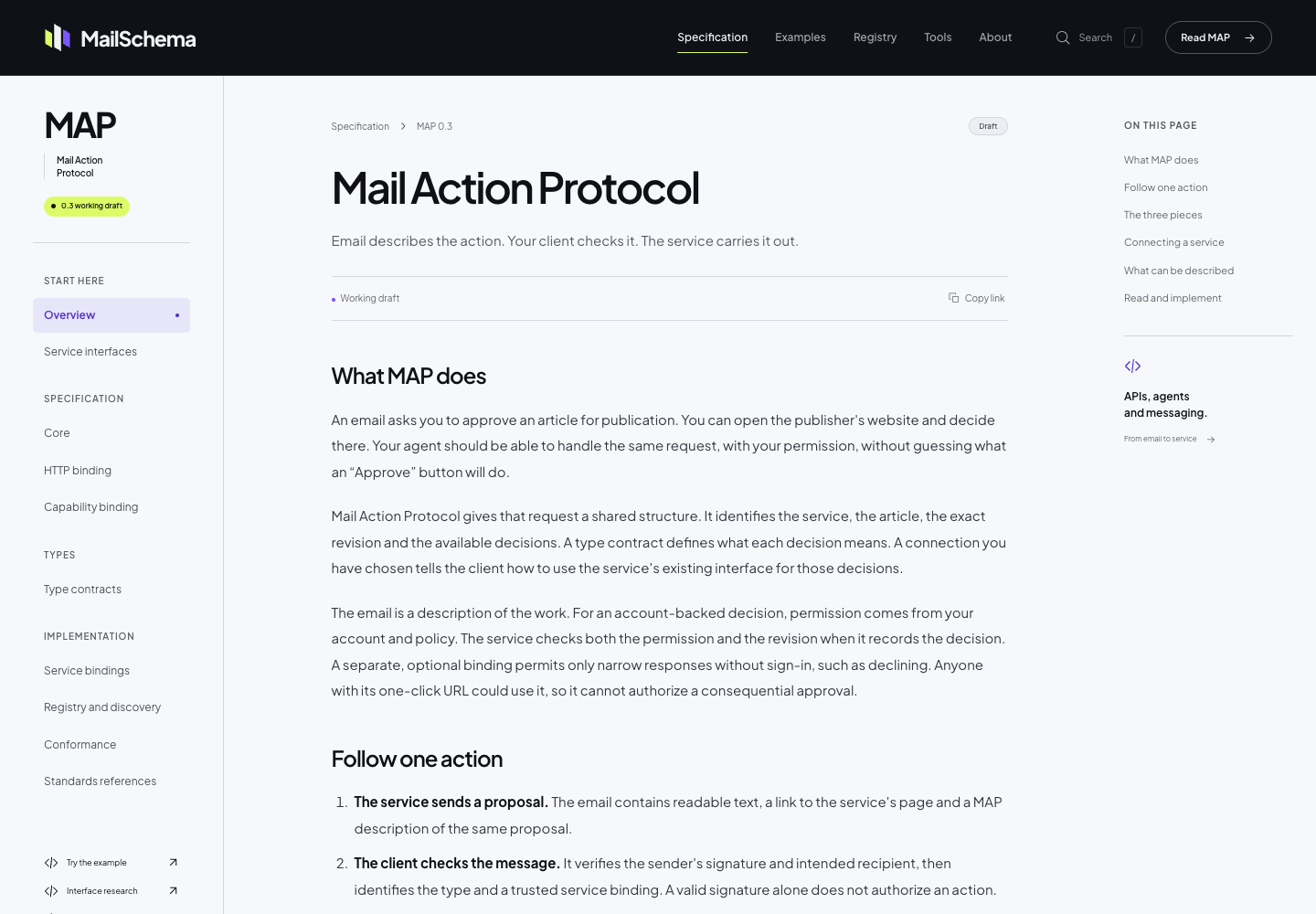
The MailSchema specification uses Sourcey’s reader theme through its Astro integration. Project fonts, colour, and CSS give the document its own identity; the chapter layout comes from Sourcey.
Choose the inputs and the site you want to maintain.
Sourcey runs as a standalone docs engine and also has an Astro integration. Starlight is an Astro documentation integration. Their layouts and extension models differ.
| Feature | Starlight | sourcey |
|---|---|---|
| Markdown documentation | Built-in | Built-in |
| Astro integration | Core model | Available alongside standalone CLI |
| OpenAPI reference | Community plugins | Built-in adapter |
| Doxygen / Go / Rust inputs | Additional tooling | Built-in adapters |
| Search | Pagefind by default | Built-in search index |
| Localization | Built-in routing and UI support | Built-in routing and UI support |
| Customisation | Astro components and plugins | Themes, CSS, source adapters |
| Software license | MIT | AGPL-3.0 |
The design, reference inputs, and workflow.
- 01
Starlight can already generate API reference
Its plugin directory includes starlight-openapi, as well as tools for other reference sources. If one of those fits your project, using it may be less work than moving. Sourcey’s reason to exist here is the combination of built-in inputs and its own rendering, rather than a claim that Starlight cannot document APIs.
- 02
The presentation is worth comparing directly
MailSchema uses Sourcey’s reader theme through the Astro integration for its specification. It has its own type, colour, and supporting site, with Sourcey handling the chapter layout. Bring a real page into both tools and judge the result. Neither a shared host framework nor a feature matrix can tell you which design fits the project.
- 03
Search is already covered in both
Starlight uses Pagefind by default and lets you configure other providers. Sourcey builds its own search index with the documentation. Test a symbol, an exact error message, and a guide topic on your own content. The presence of a search box says little about whether a reader finds the right page.
- 04
Keep the locale workflow in the comparison
Starlight has built-in support for multilingual routes and translated interface text. Sourcey also supports multilingual routes, translated interface text, and explicit fallback rules. If you already maintain a translated Starlight site, include those routes, navigation labels, and contributor processes in the cost of moving.
Try a reference section before moving the whole site.
An existing Astro project does not have to be discarded to evaluate Sourcey. Test route ownership and styling in a separate preview.
- 01
List the content and integrations
Inspect Astro configuration, Starlight plugins, content collections, frontmatter, component overrides, and locale routes. Identify any plugin-generated reference so the trial can use its original source.
- 02
Choose standalone or Astro integration
Use Sourcey’s CLI for a separate docs build, or its Astro integration for a docs section inside an existing site. MailSchema uses the latter. Run npx sourcey migrate astro --dry-run to review the native conversion, then npx sourcey migrate astro to apply it; custom components may need a mapping.
- 03
Build one guide and the reference
Start with the Markdown and OpenAPI files you maintain. This standalone config expects introduction.md, quickstart.md, and openapi.yaml beside it; the same source configuration can be used by the Astro integration.
import { defineConfig, markdown, openapi } from "sourcey"; export default defineConfig({ name: "My API", navigation: { tabs: [ { tab: "Guides", slug: "", source: markdown({ groups: [{ group: "Start here", pages: ["introduction", "quickstart"] }], }), }, { tab: "API", slug: "api", source: openapi("./openapi.yaml") }, ], }, }); - 04
Compare the reader’s route
Follow links from a guide into an operation or symbol, use search, check small screens, and open existing deep links. Include translated routes if the project has them. Keep Starlight if it already does the job with less maintenance.
Common questions.
Is Sourcey built on Astro?
Sourcey is a standalone documentation engine with a Vite-based development workflow. It also provides an Astro integration. Using that integration does not make it a Starlight theme or mean that Starlight plugins run inside it.
Should a Markdown-only Starlight site switch?
There may be no reason to. Compare the visual result if you prefer Sourcey’s themes, but include the cost of moving components, navigation, and URLs. Built-in reference inputs matter most when your project actually needs them.
Are Sourcey and Starlight licensed the same way?
No. Starlight is MIT-licensed and Sourcey is AGPL-3.0. Read the actual licenses for your intended use; being open source does not make their terms identical.