
Sourcey vs GitBook
Make the docs feel like part of your project.
GitBook gives teams a shared place to write and publish. Sourcey turns files in your repo into a designed docs site, with generated reference beside the writing. The right choice depends on how your team gets those pages written.
A technical spec can look this good.
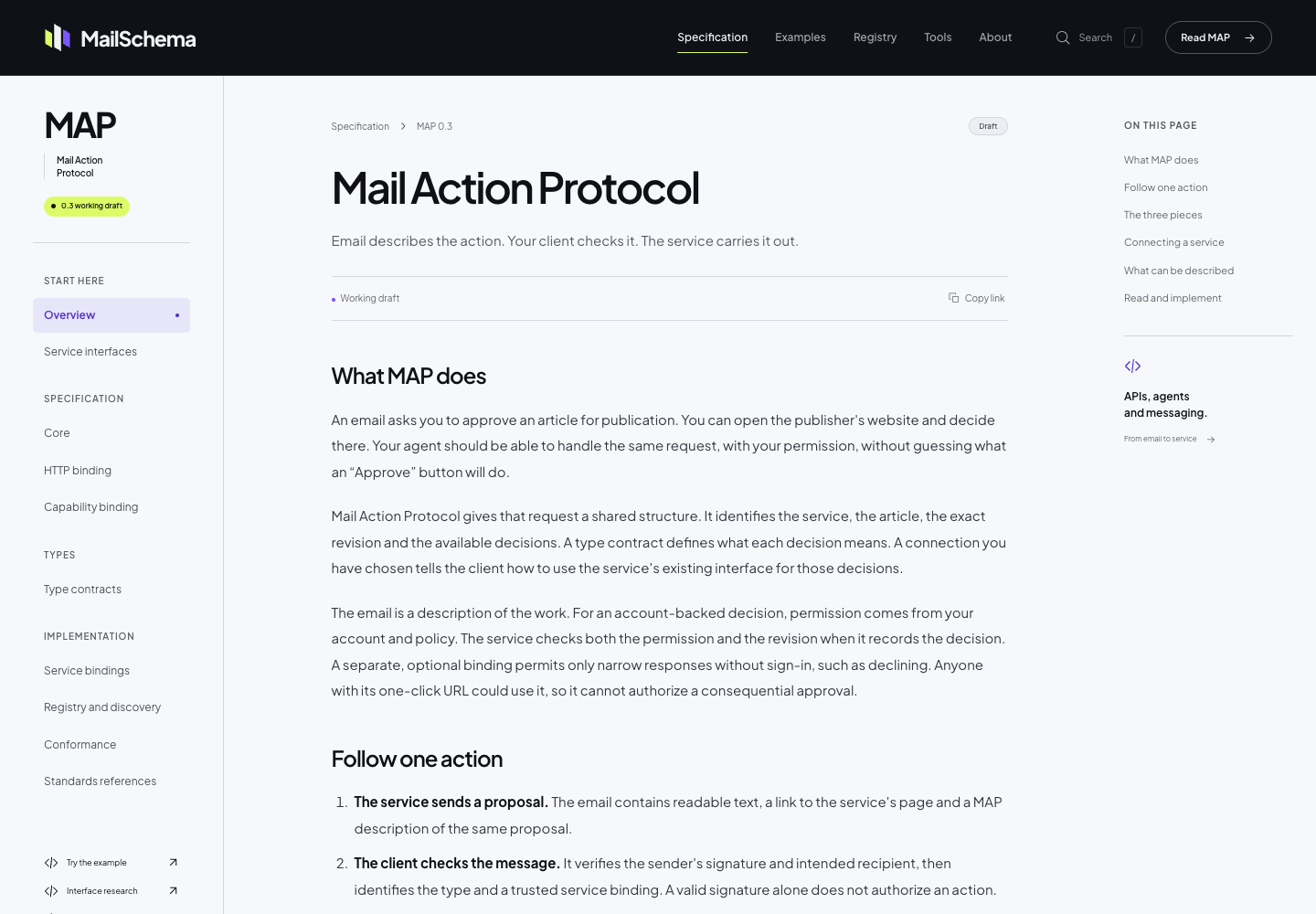
The MailSchema specification uses Sourcey’s reader theme through its Astro integration. Project fonts, colour, and CSS give the document its own identity; the chapter layout comes from Sourcey.
Start with the people doing the writing.
Both can use content kept in Git. GitBook adds a collaborative editorial service; Sourcey leaves editing and review with your repository workflow.
| Feature | GitBook | sourcey |
|---|---|---|
| Authoring | Visual editor and Git Sync | Project files |
| Review workflow | Platform and Git workflows | Your pull requests |
| Page design | Hosted site customisation | Themes, branding, CSS |
| OpenAPI reference | Supported | Built-in adapter |
| C++ / Go / Rust reference | Separate generation workflow | Doxygen / godoc / rustdoc |
| Site build | GitBook platform | Local or CI |
| Hosting | Managed; frontend can be self-hosted | Static host of your choice |
| Software cost | Free and paid plans | Free; AGPL-3.0 |
What changes when publishing moves into the repo.
- 01
Git Sync is a real feature
GitBook can sync Markdown with GitHub or GitLab in both directions. It lets a developer work in an editor while someone else works in the browser. Sourcey does not replace that collaboration service. It reads the files you give it. Moving is easier when everyone who maintains the docs already wants to work through the repository.
- 02
The renderer has a separate dependency
GitBook’s current frontend is open source and can be self-hosted, but it fetches content through GitBook’s API. Its maintainers also put maintenance of self-hosted instances on the operator. That is different from a documentation build whose output is a directory of files. Ask whether you need control over the frontend, independence from the content service, or both.
- 03
Give long documents a proper reading layout
A specification needs more than a branded header. Readers move between chapters, follow definitions, and return to the paragraph they were checking. MailSchema uses Sourcey’s reader theme for exactly that kind of document. You can inspect the type, spacing, chapter navigation, and section links on the live site before choosing a renderer.
- 04
Bring reference material into the build
If your docs cover an API or a library, handwritten explanations are only part of the work. Sourcey can render OpenAPI, Doxygen XML, Go packages, and rustdoc JSON alongside the guides. The comments and schemas remain with their owners; you do not have to keep a second handwritten list of every parameter and symbol.
Export one complete journey.
Start with the path a new user follows from installation to a working example, including the reference pages it links to.
- 01
Get the current content into Git
Use Git Sync where available and confirm the repository has the latest published edits. Inventory images, attachments, navigation, redirects, and any content stored outside that repository.
- 02
Read the exported markup
Look for GitBook-specific block syntax, embeds, tabs, and includes. Map those to supported Sourcey components or ordinary Markdown. Keep important warnings visible; do not drop them just because the original block needs conversion.
- 03
Set the reading order
Translate the existing navigation into groups. This small reader-theme config expects introduction.md and quickstart.md beside it. Check nested sections and page slugs against the old site.
import { defineConfig, markdown } from "sourcey"; export default defineConfig({ name: "My project", theme: { name: "reader" }, navigation: { tabs: [{ tab: "Documentation", slug: "", source: markdown({ groups: [{ group: "Start here", pages: ["introduction", "quickstart"] }], }), }], }, }); - 04
Test the published journey
Build and serve a preview. Ask someone who did not do the migration to follow the setup guide, use search, and open an old deep link. Keep the current site available until missing assets and redirects are accounted for.
Common questions.
Is Sourcey a replacement for GitBook’s visual editor?
No. Sourcey builds documentation from source files. If the browser editor, shared reviews, or nontechnical contributors are the main reason you use GitBook, moving to a repository-only workflow may cost more than it saves.
Can I keep my domain and page URLs?
You can publish Sourcey output under a domain you control. Keeping the paths takes an explicit navigation and redirect plan, and fragment links need checking separately. A domain move alone does not preserve links into headings.
When is Sourcey a good GitBook alternative?
When you want a distinctive, readable site built from your own files, especially if generated API or library reference belongs beside the guides. Try a complete section before committing to a migration; content portability and editing convenience are different requirements.