
Sourcey vs Doxygen
Keep Doxygen. Make the docs look good.
Your C++ comments already contain years of work. Sourcey reads Doxygen’s XML and gives that reference a new presentation, beside your guides. You keep the parser and the way your team documents the code.
The same C++ comments. A better-looking place to read them.
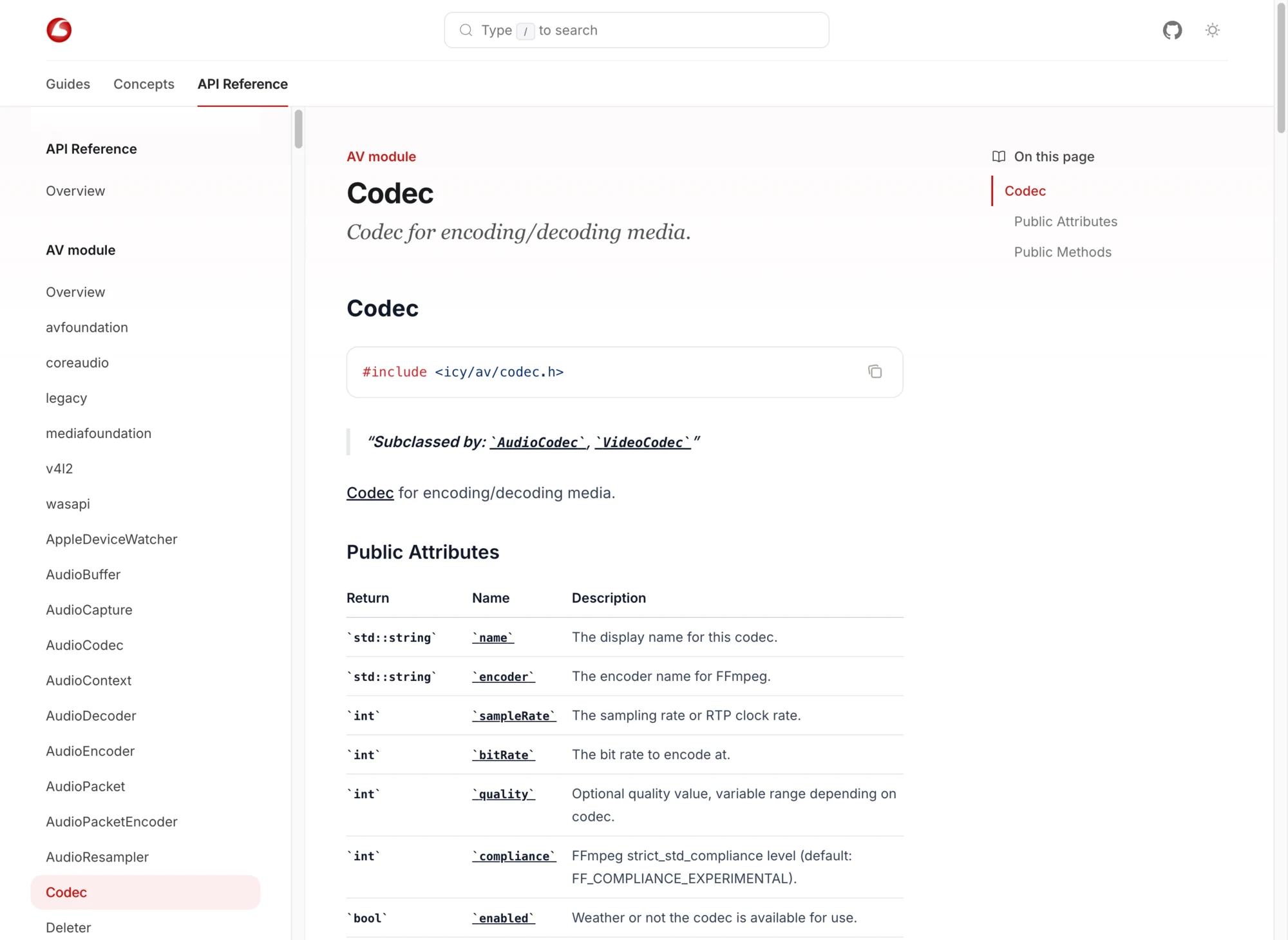
Icey keeps Doxygen for extraction and uses Sourcey to present the XML alongside its guides. Classes, signatures, and examples belong to the same site.
Change the output, keep the extraction.
This comparison is between Doxygen’s own HTML and rendering its XML through Sourcey. Doxygen remains part of the Sourcey build.
| Feature | Doxygen | sourcey |
|---|---|---|
| C++ extraction | Doxygen | Doxygen |
| Reference input | Source and comments | Doxygen XML |
| Presentation | Doxygen HTML and themes | Sourcey themes |
| Handwritten guides | Doxygen pages / Markdown | Markdown beside the reference |
| Other reference inputs | Languages Doxygen supports | Also OpenAPI, Go, Rust, MCP |
| Build requirements | Doxygen | Doxygen plus Sourcey |
| Hosting | Your static host | Your static host |
| Existing member URLs | Retained with current renderer | Check and map new anchors |
The parser has already done the hard work.
- 01
XML is the handoff
Doxygen can write structured XML containing the declarations, relationships, and comments it extracted. Sourcey reads that output. You do not need to rewrite comments or choose a new C++ parser to change the site. Keep the Doxyfile with the code and regenerate the XML as part of the docs build.
- 02
The visual improvement should be obvious
Icey shows why we built this path. The C++ reference gets the same attention to type, spacing, navigation, and examples as the handwritten guides. Open a class page, follow a type link, then come back to the explanation. That is the experience to judge, beyond whether the first screen looks newer.
- 03
Fix missing symbols before rendering
Macros, input paths, and exclusion rules affect what Doxygen sees. If a declaration is absent or wrong in the XML, Sourcey cannot reconstruct it from the finished output. Check an overloaded method, a template, inherited members, and cross-references against the current docs before deciding the renderer is ready.
- 04
Sometimes a theme is enough
Doxygen Awesome styles Doxygen’s existing HTML. If you like the current structure and only want a visual refresh, that may be the smaller change. Sourcey is useful when you want a different site layout, guides beside the reference, or several kinds of reference in the same build.
Start with one awkward part of the API.
Choose a real namespace with templates, overloads, comments, and links. A trivial class will not exercise the renderer.
- 01
Generate XML alongside the current output
Enable XML in the existing Doxyfile. Create the parent directory with mkdir -p build, then run doxygen Doxyfile. Keep the current HTML during the comparison. The settings below put XML where the Sourcey config in the next step expects it.
OUTPUT_DIRECTORY = build/doxygen GENERATE_XML = YES XML_OUTPUT = xml - 02
Point Sourcey at that directory
Place the config at the project root or adjust the relative XML path. Doxygen must have finished successfully before Sourcey runs; the renderer consumes the XML rather than invoking a replacement parser.
import { defineConfig, doxygen } from "sourcey"; export default defineConfig({ name: "My C++ library", navigation: { tabs: [{ tab: "C++ API", slug: "cpp", source: doxygen({ xml: "./build/doxygen/xml" }), }], }, }); - 03
Read the rendered API
Compare declarations, qualifiers, overloads, examples, and links with the original. Add a guide that links into the reference. Check source links before publishing if the XML includes paths you do not intend to expose.
- 04
Preserve the useful entry points
Record class and member URLs used in issues, README files, and support replies. Check the new paths and fragment identifiers, then add redirects where possible. Keep the old build until those links have a destination.
Common questions.
Does Sourcey replace Doxygen?
No. In this workflow Doxygen parses the C++ and produces XML; Sourcey renders that XML into the docs site. It is an alternative to Doxygen’s default presentation, not its parser.
Should I use Moxygen instead?
Use Moxygen when the next tool in your publishing pipeline needs Markdown generated from Doxygen XML. Use Sourcey’s direct XML input when Sourcey is rendering the site and you do not need that intermediate set of Markdown files.
Will the new site preserve every Doxygen feature?
Check the features your project uses. Rendering the XML does not guarantee identical output, graph layouts, or anchors. Keep Doxygen’s own HTML if a particular view is essential and the Sourcey version does not meet that need.