
Keep the Markdown. Give the reference a home beside it.
Sourcey vs Material for MkDocs
Material made good-looking documentation accessible to a lot of projects. Sourcey offers another route, with its own themes, an importer for MkDocs content, and direct inputs for API and code reference.
A technical spec can look this good.
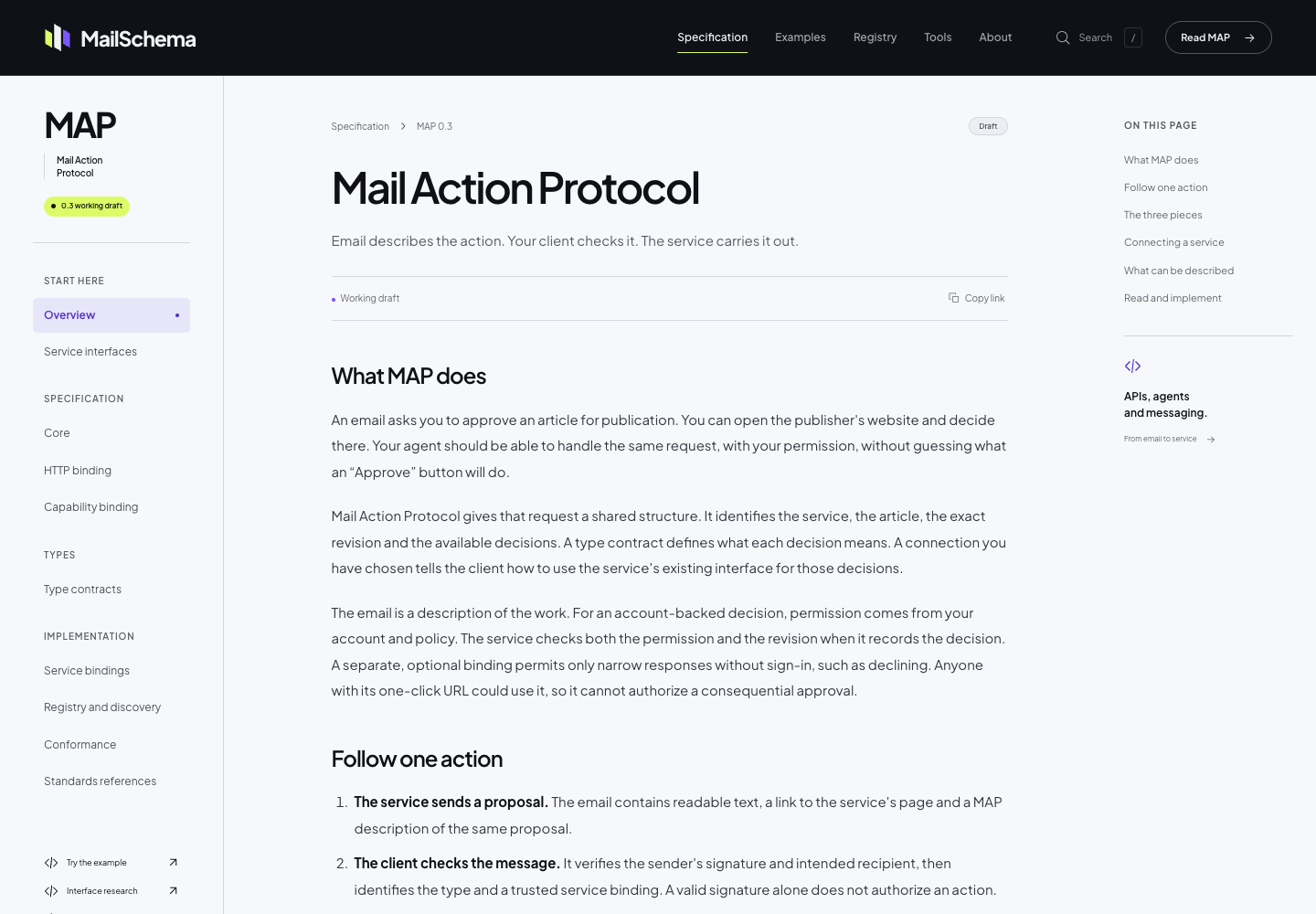
The MailSchema specification uses Sourcey’s reader theme through its Astro integration. Project fonts, colour, and CSS give the document its own identity; the chapter layout comes from Sourcey.
Import the content; audit the build behaviour.
Sourcey’s one-time migration reads a MkDocs configuration for its pages and navigation. It does not run the Python plugins that may be producing part of your current site.
| Feature | Material for MkDocs | sourcey |
|---|---|---|
| Content | Markdown | Native Markdown after migration |
| Navigation | mkdocs.yml | Migrated once to native config |
| Presentation | Material theme and extensions | Sourcey themes and CSS |
| Python API reference | mkdocstrings handlers | No Python autodoc built in |
| OpenAPI / C++ / Go / Rust | Plugins or extra generation | Built-in adapters |
| Python plugins | Run during the build | Not executed |
| JavaScript | Search and theme behaviour | Search and navigation behaviour |
| Hosting | Your static host | Your static host |
Check what the configuration is really doing.
- 01
The maintenance picture has changed
As of 16 October 2026, Material for MkDocs is in maintenance mode. Its maintainers list 5 May 2027 as the end of upstream maintenance and point to Zensical as their successor. Include that option in your evaluation. Existing pages do not suddenly stop working, but the next build tool should be a deliberate choice.
- 02
The importer is useful, with a clear boundary
Sourcey’s one-time migration reads docs_dir and nav from mkdocs.yml, collects local assets, and converts supported admonitions, tabs, and local snippet includes. Later builds use native Sourcey files. It does not execute the plugins or Python Markdown extensions listed in that file. Pages produced by macros, API handlers, or custom plugins need their own migration plan.
- 03
Python reference may belong with mkdocstrings
Mkdocstrings has a handler-based system for generating reference, including Python documentation. If that is the centre of your site, Sourcey is not a like-for-like replacement. Its reference adapters cover different inputs. Test the actual packages you document before deciding that reducing the toolchain will reduce the work.
- 04
Try the design on a long page
Sourcey’s reader theme is built for pages people spend time reading. MailSchema shows it on a technical specification, with project branding and chapter navigation. Your existing Markdown gives you a quick way to compare layouts. Look at tables, nested lists, code, and the mobile page as well as the title screen.
Preview the migration before applying it.
Keep the current build available so you can compare content and catch anything a plugin used to generate.
- 01
Inventory plugins and extensions
Read mkdocs.yml and the build script. List macros, generated pages, API reference handlers, custom hooks, and remote content. Check whether those produce source files Sourcey can read or depend on MkDocs execution.
- 02
Convert to a native Sourcey project
Run npx sourcey migrate mkdocs --dry-run, review the report, then run npx sourcey migrate mkdocs. This native config expects introduction.md and quickstart.md beside it, with an OpenAPI adapter for reference. Keep a copy of the original files while trying it. Remove the API tab if your project has no OpenAPI spec.
import { defineConfig, markdown, openapi } from "sourcey"; export default defineConfig({ name: "My project", navigation: { tabs: [ { tab: "Guides", slug: "", source: markdown({ groups: [{ group: "Start here", pages: ["introduction", "quickstart"] }] }) }, { tab: "API", slug: "api", source: openapi("./openapi.yaml") }, ], }, }); - 03
Check imported meaning, not just page count
Inspect admonitions, tabs, snippet includes, image paths, and nested navigation. Look for literal plugin syntax left in the page and content that was present in the old build but is now absent.
- 04
Compare the available migration routes
Try Sourcey and, where relevant, the maintainer’s Zensical migration path using the same content. Include reference generation, custom plugins, search, URLs, and design in the comparison before replacing the current build.
Common questions.
Will Sourcey execute my MkDocs plugins?
No. The one-time migration converts supported content and navigation to native Sourcey files. Later builds do not read mkdocs.yml. Python plugins, macros, and extension-generated pages need review and a replacement where necessary.
Are Material’s Insiders features still behind sponsorship?
The Material maintainers released the former Insiders features in version 9.7.0 and ended that model. A comparison based on a current Insiders paywall would be misleading. The more relevant question now is the maintenance and migration plan.
Should I move to Sourcey or Zensical?
Try Zensical when continuity with the Material ecosystem is the priority. Try Sourcey when you want its layouts and reference inputs alongside your Markdown. In either case, test the plugins and generated content your site actually uses; configuration import is not proof of full compatibility.