
guides
Rust API Docs on Your Own Site
Bring Rustdoc API references and doctests into your own documentation site, beside your guides. Configure Sourcey’s Rust adapter and keep the build reproducible.
Rustdoc knows your crate. It understands traits, associated items, implementations, intra-doc links, and examples that double as tests. That work belongs in your documentation, even when you want a site with more character and a place for the rest of the project.
Sourcey brings that reference into the same site as your guides, architecture notes, and other interfaces. You keep writing documentation beside the Rust code. Sourcey handles the presentation: a reference that fits your site, with the navigation, typography, and branding you choose.
This is particularly useful when the crate is one part of a larger product. A developer might need to install a CLI, understand a protocol, and then use the Rust library. They should be able to follow that explanation into a trait or example without piecing together several unrelated documentation sites.
Run the same build
The working Rust reference uses Sourcey’s existing adapter test crate. It has a Widget, an Introducer trait, methods and documentation tests with hidden setup. You can open the source beside the page and follow what happened to each comment.
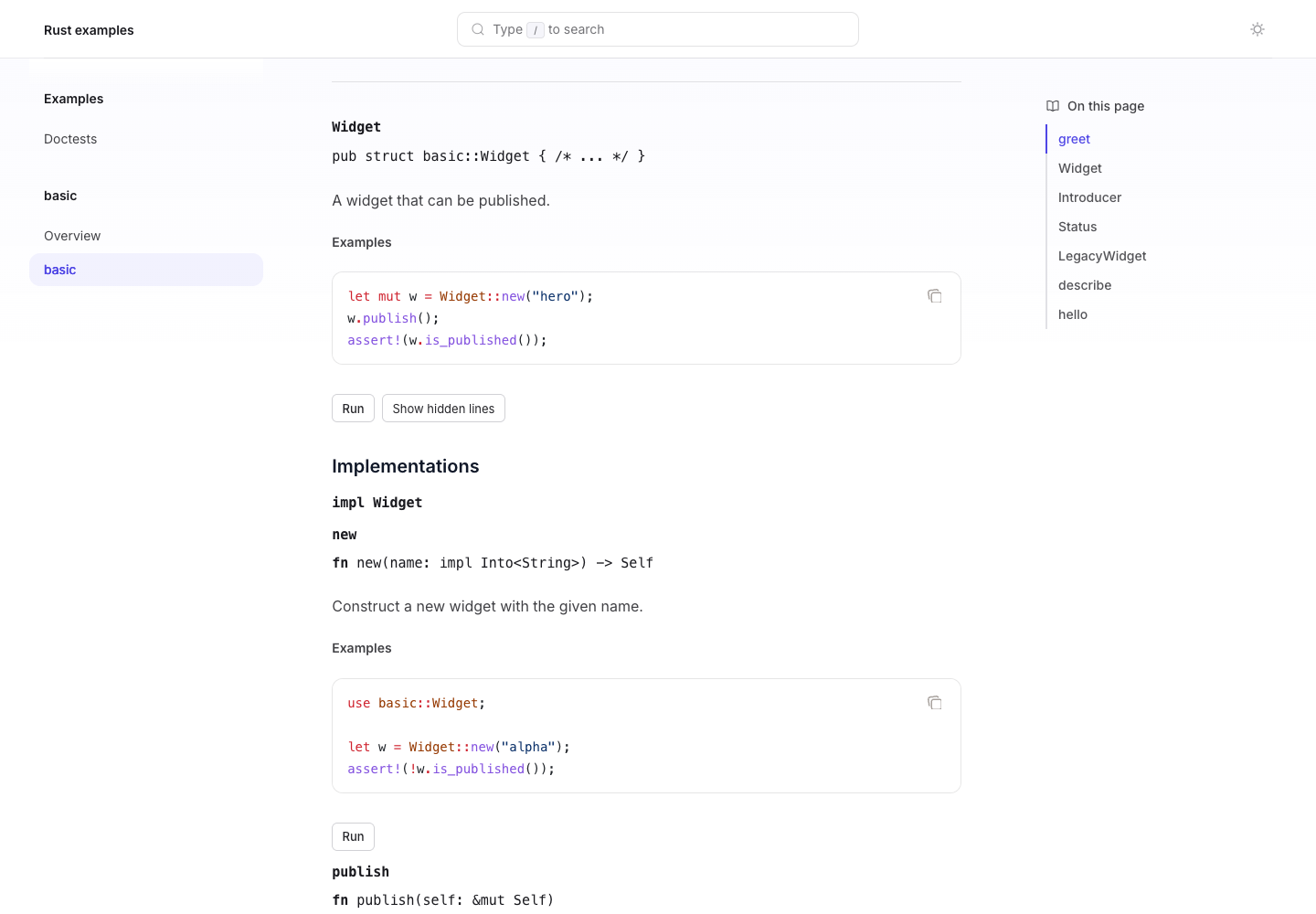
The downloadable project includes the crate, configuration, package lock and generated snapshot. To render it:
unzip rust-api-docs.zip
cd rust-api-docs
npm ci
npm run build
This path needs Node.js 22.22.2 or later, 24.15 or later, or 26, and no Rust installation. The saved snapshot supplies the reference. The included README explains the deployment path and how to regenerate it from the crate.
We checked the full extraction and rendering on macOS arm64 with Sourcey 3.6.14, its bundled sourcey-rustdoc 0.1.1 helper, and nightly-2026-05-15 (rustc 1.97.0-nightly, Rustdoc JSON format 57). Default features, no additional Cargo features. Seven doctests passed; the macro example explicitly marked ignore was skipped. The source is pinned to this fixture revision.
Try the Widget example: reveal its hidden import and main wrapper, then hide them again. The Doctests index also includes no_run, compile_fail and should_panic examples with their labels intact. Those labels tell a reader whether an example is meant to run, refuse compilation or panic.
Keep Rustdoc in the process
Sourcey’s Rustdoc adapter consumes Rustdoc JSON through a bundled Rust helper and turns it into a versioned RustdocSpec snapshot. The site renderer then uses that snapshot to build the reference. The extraction and presentation are separate steps.1
That separation gives you a choice about your build. You can extract directly from the crate when building locally, or commit a generated snapshot and render it elsewhere. The rendering environment does not need a Rust toolchain when it reads an existing snapshot.
Rustdoc JSON is an experimental output and uses a nightly toolchain. Pin the toolchain used for extraction, along with the Sourcey version, so the reference has a repeatable source. Once extracted, the snapshot is the input to your site build.2
Rust source and documentation comments
        ↓ Rustdoc extraction
Versioned documentation snapshot
        ↓ Sourcey build
Your project site
Your Rust comments remain the source of the API description. There is no second set of hand-written Markdown signatures to keep in step with the crate.
Choose the build mode deliberately
The adapter has three modes:
| Mode | How the documentation input is produced | Useful when |
|---|---|---|
live |
Invoke the bundled helper to extract the crate’s documentation. | You want to regenerate from the current source as part of the build. |
snapshot |
Read the generated snapshot at the configured path. | Extraction and site rendering happen in different environments or stages. |
auto |
Use the available nightly toolchain, otherwise read a configured snapshot. | You want convenient local behaviour and will inspect which path was used. |
For a release build, an explicit choice makes the process easier to reproduce. If you use snapshot mode, update the snapshot alongside the release it describes. If you use live mode, make the extraction environment part of the build configuration.
Add a Rust API tab to your Sourcey configuration:
import { defineConfig, rustdoc } from "sourcey";

export default defineConfig({
  name: "My Crate",
  navigation: {
    tabs: [{
      tab: "Rust API",
      slug: "rust-api",
      source: rustdoc({
        manifest: "./Cargo.toml",
        mode: "snapshot",
        snapshot: "./snapshots/rustdoc.json",
        doctestsIndex: true,
      }),
    }],
  },
});
With this config beside Cargo.toml and Sourcey installed locally, generate the snapshot from the crate root:
mkdir -p snapshots
rustup toolchain install nightly-2026-05-15
cargo run --locked --release --quiet \
  --manifest-path ./node_modules/sourcey/dist/core/sourcey-rustdoc/Cargo.toml \
  -- --manifest ./Cargo.toml --toolchain nightly-2026-05-15 \
  --output ./snapshots/rustdoc.json
The first manifest selects Sourcey’s extraction helper; the second selects your crate. The output is Sourcey’s snapshot format, ready for mode: "snapshot". Raw Rustdoc JSON is an intermediate input, not an interchangeable file to put at that path.
The command uses the same dated nightly as the working example. Keep the Sourcey version in your lockfile too. When changing either version, regenerate and inspect the snapshot before publishing. Put snapshot generation before the site build in the release job. A successful site build in snapshot mode only tells you it could render the snapshot it was given.
An example has a readable form and an executable form
Rust documentation tests are worth preserving properly. A short example may omit setup from the displayed view while keeping that setup in the executable code. Rustdoc uses #-prefixed lines for this purpose.
Sourcey renders the short display form and lets the reader reveal the hidden lines. The executable form remains available to copy or open in the Rust Playground. Badges identify fence attributes such as no_run, ignore, compile_fail, and should_panic. An example marked compile_fail is teaching something by refusing to compile. Keeping that label visible saves the reader from trying to fix it.
For example:
/// ```
/// # let values = vec![1, 2, 3];
/// let doubled: Vec<_> = values.iter().map(|value| value * 2).collect();
/// assert_eq!(doubled, vec![2, 4, 6]);
/// ```
The values setup can stay out of the main reading flow while remaining available to someone who wants the complete example. The reader gets the short explanation first and the complete setup when they need it.
Keep running the crate’s examples with cargo test --doc under the relevant configuration. A Playground link is useful too, but the remote environment still needs the dependencies and capabilities the example requires.3
The optional Doctests index brings the examples together and links them back to their parent items. For someone exploring a crate, that can be a more useful starting point than a long list of types.
The reference describes a particular build
A crate version is part of the answer. Features and target configuration are part of it too.
If an API is gated behind an optional feature, the reader needs to know which reference they are looking at. The same applies to target-specific items. State the configuration used to produce the documentation and keep it with the source revision and toolchain pin.
Keep the crate revision, feature selection, target, extraction toolchain, and Sourcey version with the snapshot. When someone reports that a method is missing, those details help establish whether they are reading the documentation for the build they actually use.
This also helps when updating the site. Regenerating a snapshot is a meaningful change that can be reviewed beside the crate change. The site build then presents that selected version. You can review the reference change before publishing it, just as you review a source change before releasing the crate.
Links should take the reader to the thing they meant
Rust references have relationships that deserve more care than ordinary page links: a trait and its implementations, an associated item and its parent, a re-export and its target.
The adapter uses Rustdoc’s per-item link information to resolve intra-doc links. Workspace items can link within the site; standard-library references can lead to Rust’s own documentation; external crate references use their available documentation roots. Sourcey also uses deterministic item anchors such as struct.Widget and associatedtype.Item, with Rustdoc conventions guiding the generated links.
Before publishing, follow a type link, a trait member, an associated item, a re-export, and an external crate reference. Check the destination version as well as whether the URL opens. External references can fall back to docs.rs latest when no documentation root is available; that is worth checking when the guide depends on a particular dependency version.
Keep docs.rs links where they help. Developers already use that reference, and your project site can give them the guides and examples around it. Owning a documentation site does not require pulling the crate out of the conventions of its ecosystem.
Give the API a place in the project
A reference tells someone what a type exposes. A guide can tell them why they would reach for it, where it fits in the application, and what a complete use of it looks like.
Put one of those guides beside the generated reference. Link directly to the trait it uses. Show the example with its required features and setup. If the product also has an HTTP API or MCP tools, give those interfaces a place in the same navigation.
This is where the presentation earns its keep. The reader should be able to move between explanation and precise definitions without losing their place. You get to make that route feel like your product while Rustdoc continues doing the language-specific work underneath it.
The Rustdoc adapter reference covers the configuration and extraction commands. Keep the chosen versions and generated snapshot with the project so the next person can build the same reference.