
Your API deserves a good-looking place to land.
Sourcey vs Fern
Fern brings SDK generation and interactive documentation together. Sourcey makes sense when you want beautiful API docs, guides, and code reference from a build you control. If Fern’s SDK tooling is doing useful work, keep it in the picture.
Give people a docs link you’re proud to send.
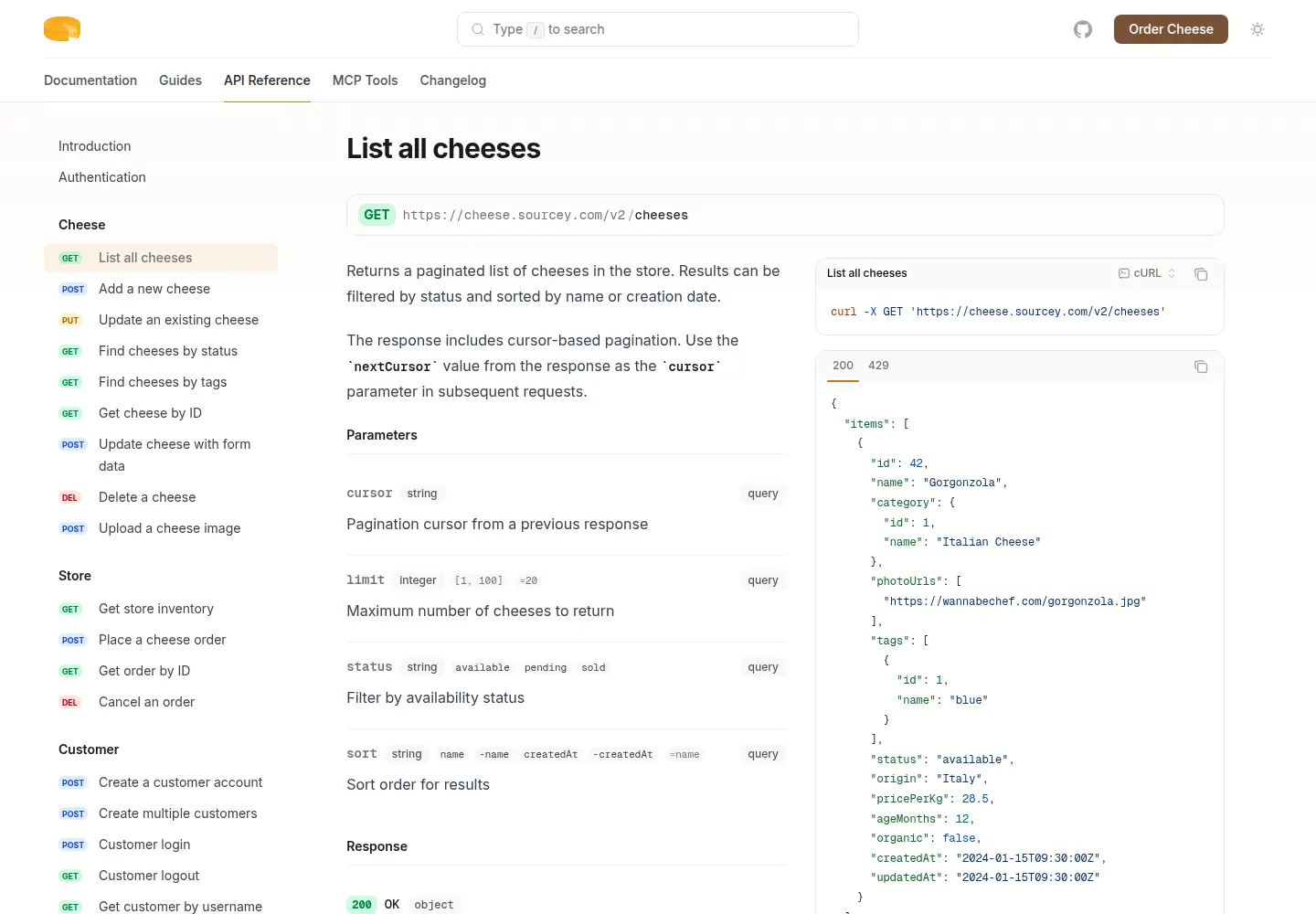
Cheesestore puts an OpenAPI reference beside guides and an MCP manifest in one Sourcey build. The cheese service is fictional; this is the actual generated site.
Decide how much of the platform you need.
Both take presentation seriously. The bigger difference is what happens around the page: generating client libraries, authenticating test requests, and operating the published site.
| Feature | Fern | sourcey |
|---|---|---|
| OpenAPI reference | Built-in | Built-in |
| Guides and navigation | MDX and docs.yml | Markdown and TypeScript config |
| API request console | API Explorer | Built-in Try it |
| SDK generation | Generates client libraries | Renders documentation; does not generate SDKs |
| Custom styling | Theme settings; custom CSS/JS on Enterprise | Themes, fonts, colours, and custom CSS |
| Self-hosting | Enterprise Docker image | Static build on your own host |
| Open-source code | Apache-2.0 repository; no longer maintained | AGPL-3.0 documentation engine |
| Code reference inputs | API definitions and generated SDK references | Doxygen XML, Go packages, and rustdoc JSON |
Look beyond the generated endpoint page.
- 01
An SDK example is different from an HTTP example
Fern can show snippets that call your generated SDK, with examples that respond to parameter changes. Sourcey generates request examples from OpenAPI, but it does not generate or publish your client libraries. If developers arrive looking for the exact method in your Python package, keep that workflow and its release process accounted for.
- 02
Fern does offer self-hosting
Its documented path uses an Enterprise Docker image, with HTML rendered during the image build. Sourcey’s ordinary build writes a directory of static files. The practical choice is whether you want to operate Fern’s container or publish files through your existing hosting pipeline.
- 03
Try your own branding on a real page
Fern has settings for colour, typography, and layout; its custom CSS and JavaScript feature is documented as Enterprise. Sourcey includes custom styling with the engine. Put your longest endpoint, densest schema, and most awkward code sample through the theme before deciding. A tidy homepage is the easy part.
- 04
A working request console may be worth keeping
Fern’s API Explorer lets readers send requests with authentication and values from the spec. Sourcey’s built-in Try it console also sends requests from OpenAPI operations, using API keys, Basic authentication, and existing tokens. Check how your users test an integration before removing a tool they rely on.
- 05
Check which code the licence covers
Fern’s Apache-2.0 repository says the open-source project is no longer maintained and points readers to its service. That matters if you rely on those tools, but it is a separate question from how the documentation service is deployed. Sourcey’s AGPL-3.0 engine includes the docs renderer you run locally.
Start with the spec and one complete guide.
Keep the SDK release pipeline running while you try the docs separately. One authentication guide and an endpoint make a better test than an empty landing page.
- 01
Identify the source of the reference
Start with the OpenAPI file that drives your REST reference. A Fern Definition, AsyncAPI file, or Protobuf schema is a different input; this OpenAPI migration does not make those formats interchangeable. List the SDK examples, request-console behaviour, and extensions you need to preserve.
- 02
Move a guide with its assets
Fern projects keep MDX pages, reusable snippets, and images under the fern directory, with navigation in docs.yml. Bring the source files into a trial build. Plain prose is straightforward; Fern components, React imports, snippet includes, and navigation need translating and checking.
- 03
Build the guide beside the API
Create introduction.md and quickstart.md in the project root, and put your API definition at openapi.yaml. This config gives the guides and reference separate tabs in one site. Install Sourcey, then run npx sourcey dev to inspect it.
import { defineConfig, markdown, openapi } from "sourcey"; export default defineConfig({ name: "My API", navigation: { tabs: [ { tab: "Guides", slug: "", source: markdown({ groups: [{ group: "Start here", pages: ["introduction", "quickstart"] }], }), }, { tab: "API", slug: "api", source: openapi("./openapi.yaml") }, ], }, }); - 04
Follow an integration from start to finish
Build with npx sourcey build and serve dist on a preview host. Follow authentication, copy a request, check an error response, and open the page on a phone. Map old page URLs and endpoint anchors before changing domains. Decide where SDK examples will live, and test Sourcey’s built-in Try it console.
Common questions.
Is Fern open source?
Fern’s CLI and generator repository is published under Apache-2.0, but its notice says the open-source project is no longer maintained and points readers to Fern’s service. That is separate from the terms and infrastructure for its documentation service: the documented self-hosting path uses a private Enterprise Docker image. Sourcey’s documentation engine is AGPL-3.0 and builds locally without a hosted account.
Can I keep Fern for SDKs and use Sourcey for docs?
Yes, when the two builds can consume the API definition you maintain. Keep Fern’s SDK generation and package releases in their existing pipeline, then build Sourcey from the OpenAPI input. Check examples against the shipped SDK versions; Sourcey does not recreate Fern’s dynamic SDK snippet integration.
Will Fern MDX work unchanged?
Do not assume it will. Ordinary Markdown, links, and fenced examples are the easy part. Check every Fern component, reusable snippet, React import, and asset path. Move a guide that uses those features before estimating the rest of the migration.